Rohos Logon Key Free
 Secure authentication solution that converts any USB drive into a security token for your computer and allows you to access Windows in a secure way by means of a USB token, replacing the Windows login.
Free
Secure access to:
Any Windows PC
Your computer security benefits:
- Replaces the weak password-based login with a hardware USB key (USB flash drive or memory card)
- Uses a long and powerful password, without the need to remember it
- Logging in with a USB key is fully automatic and fast!
- The system is password-protected but you don’t need to enter the password manually each time you log in to or unlock Windows
- Restrict access to a computer based on a USB key
- Assigning a password to your user account brings better protection for a hibernated computer.
Risk-free:
- Rohos uses NIST-approved data-security principles: the password is not stored on the USB key in open form. USB key copy protection does not allow creating unauthorized Key duplicates. All data on the key is encrypted with AES 256-bit key length.
100% absolutely free software
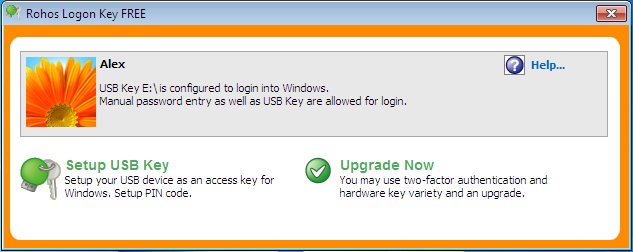
Supports a variety of authentication tokens:
- any USB flash drive
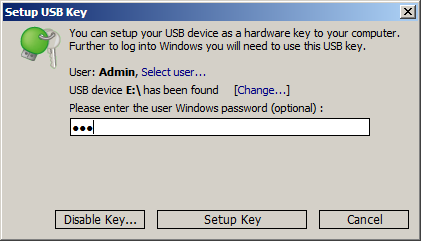
Dialog for setting up a USB key
Coparison Matrix – Rohos Logon Key /Rohos Logon Key (Free):
Key features | Shareware | Free |
| Automatic log in to Windows with a USB key |  | |
| Uses a long and powerful password, without the need to remember it | | |
| Replaces weak password-based login with a hardware USB key | | |
| Secure 2-factor login: Your USB key + PIN code | |  |
| Restrict access to a computer based on a USB Key | | |
| Emergency logon helping you access your system in the event of a lost USB drive or forgotten PIN code | | |
| Authentication tokens supported:USB flash drive | | |
| USB tokens/smart cards like Aladdin eToken PRO, Futako HiToken v22, Aktiv ruToken, uaToken, Crypto Identity 5,etc. YubiKey and Swekey – One Time-Password tokens. Fingerprint USB flash drive, e.g. Transcend, Apacer, LG, TakeMS, etc. Bluetooth-enabled wireless devices, e.g. Pocket PC, Mobile, RFID tags |

awl tibunoth kyapalla
ReplyDelete